ConnectWise Integration
Strety + ConnectWise Integration: Two-Way Sync for MSPs
Strety’s two-way ConnectWise integration syncs your To Dos with ConnectWise Tickets, Activities, and Projects automatically. Bring your EOS work into your PSA and switch to fewer logins to make space on your screen (and in your mind). Built for MSPs who run EOS in Strety and manage service delivery in ConnectWise.
How the Strety + ConnectWise integration works
No more logging to several tools to get EOS traction — your Strety To Dos auto-create ConnectWise Tickets, Activities and Projects. Manage and update your work directly in your favorite PSA.

Create once
Open a linked To Do in Strety — it’ll generate a new Ticket, Activity or Project in ConnectWise. No need to hop between platforms.

Connect Rocks
Create linked Projects out of your quarterly Rocks directly from Strety — your new Projects will be added to ConnectWise in one click.

Live in your PSA
You close your Tickets, Activities or Projects in ConnectWise, the linked items in Strety auto-complete. All done in your PSA!
How to get started with the Strety + ConnectWise integration
Setting up ConnectWise as a To Do integration in Strety only takes a couple of minutes — in four easy steps you will switch to less open tabs and more work done. Note: ConnectWise is an organization-wide integration in Strety. A Strety admin must set it up in Adminland before individual team members can link their To Dos to ConnectWise.
Step 1:
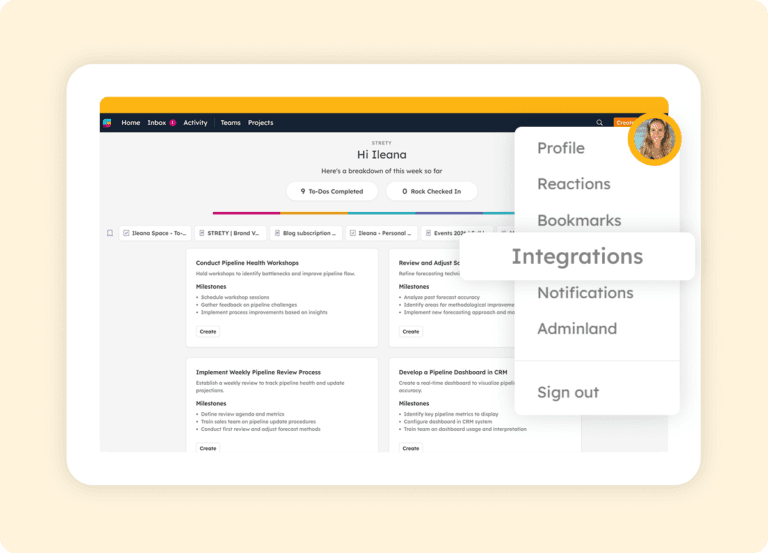
Navigate to Integrations
First, go to your Strety profile (where there is the icon with your pic or initial), and choose Integrations.
Step 2:
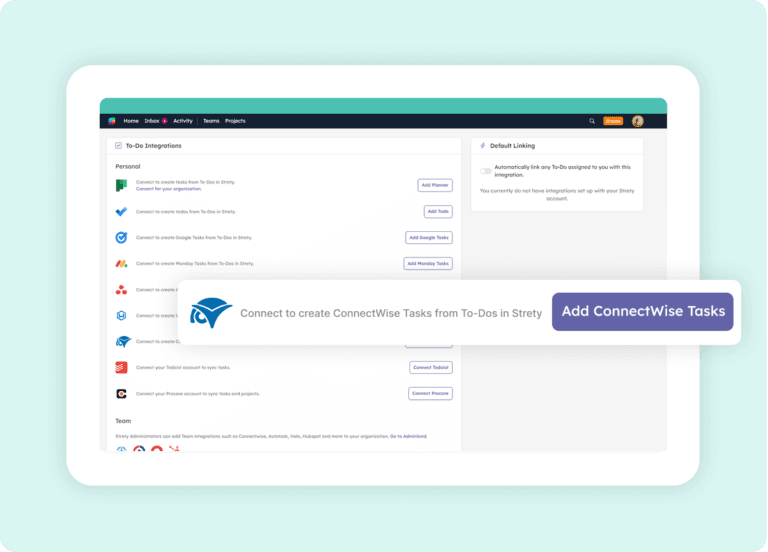
Add ConnectWise and Configure Access
Select ConnectWise from the displayed integrations.
Step 3:
Create Your First Linked To Do
Done! Open your first linked To Do in Strety and select the ConnectWise icon, choosing the right company, board, and task’s owner — a linked Ticket, Activity or Project in ConnectWise will be auto-generated. That’s the joy of working in sync!

Step 4:
Link Rocks to ConnectWise Projects
After your Quarterly planning meeting, link new Rocks directly to ConnectWise Projects as the integration and the relevant Project to link it to. Your new Project will land right where you want it in ConnectWise — it’s that simple.


Frequently asked questions about the Strety + ConnectWise integration
How do I know the Strety ConnectWise integration was added successfully?
Once the ConnectWise integration is configured by your Strety admin and you create a new To Do, you’ll see the ConnectWise logo on your To Do. That confirms the integration is active and ready to sync items between the two platforms.
Is ConnectWise a team or personal integration in Strety?
ConnectWise is an organization-wide integration in Strety. It needs to be set up by a Strety admin in Adminland before individual team members can link their To Dos to ConnectWise items.
Where do I close linked items between Strety and ConnectWise?
You close linked items directly in ConnectWise. Once a Ticket, Activity, or Project is closed in ConnectWise, the linked To Do automatically closes in Strety on the next sync. To Dos linked to ConnectWise items can’t be closed directly from Strety.
What types of ConnectWise items does the Strety integration support?
The integration supports two-way sync between Strety To Dos and ConnectWise Service Tickets, Activities, and Projects — covering the full range of ConnectWise work types your team manages.
How do I link a Strety Rock to a ConnectWise Project?
After your Quarterly Planning meeting, create your Rocks in Strety and select the ConnectWise integration at the bottom of each Rock. Choose the Project to link it to, and your Rock will stay connected to that Project’s progress in ConnectWise.
How fast is the sync between Strety and ConnectWise?
Strety syncs with ConnectWise every 30 minutes automatically. You can also trigger a manual sync from any linked To Do if you need an update faster.
Can I set ConnectWise as my default To Do integration in Strety?
Yes. Once the ConnectWise integration is set up, you can select it as your personal default. Every new To Do assigned to you will automatically link to a ConnectWise item — saving clicks on every task.
Can I have multiple To Do integrations in Strety?
Who should set up the ConnectWise integration in Strety?
A Strety admin must configure the ConnectWise integration in Adminland before team members can use it. The admin will need ConnectWise API credentials with the appropriate access level. Strety provides setup documentation in the help center.
Who is the Strety + ConnectWise integration built for?
The integration is built for MSPs and service delivery teams who run EOS in Strety and manage their service work in ConnectWise. It eliminates context-switching between EOS tools and the PSA where technical teams spend most of their day — and uniquely supports Tickets, Activities, and Projects in one integration.
What people love about Strety’s ConnectWise integration 💜

For the technical team, the ConnectWise integration has been a game-changer.

A fresh approach with integrations into Teams & CW Manage makes Strety a part of our everyday instead of being just ‘another tool’.
More to Explore
Help Docs
Want a full walkthrough on setting up the Strety + ConnectWise integration? Start here.

All Integrations
Discover more of Strety’s integrations to connect your fav tools with your EOS® implementation.
More Features
Check out Strety’s built-in tools for EOS® implementation plus everyday execution.
Want to test-drive the Strety + ConnectWise integration?
Start your free trial now to see how it feels to integrate your EOS software with your PSA. (Hint: it’s awesome.)