Running a growing business often feels like juggling priorities while trying to keep your team pulling in the same direction. If people seem to be rowing different ways and you can’t break through to the next level, EOS might be the framework you need.
EOS gives you a clear structure for getting everyone on the same page around vision, priorities, accountability, and execution. And as you start using it across the business, you also need a practical way to keep that rhythm clear, consistent, and easy for your team to use every week and every quarter.
This guide walks you through what EOS is, how implementation works, and how to run it day to day with less friction. We run our own business on EOS, and we built Strety after living through the challenges of managing meetings, priorities, issues, and accountability across disconnected tools.
For a broader starting point, see our guide on getting started on EOS.
Table of Contents
- What Is EOS?
- The Core Problem EOS Solves
- The Six Key Components of EOS
- How EOS Actually Works in Practice
- Who Should Use EOS?
- The Benefits of Implementing EOS
- Common EOS Implementation Challenges
- EOS Software vs. Manual Implementation
- How to Run EOS Day to Day with Software
- Getting Started with EOS
- Why Operators Choose Strety for EOS Software
- Final Thoughts
What Is EOS?
EOS runs on six components — Vision, People, Data, Issues, Process, and Traction — that give a leadership team one shared way to set direction, assign accountability, and execute every week. For the full breakdown, see our complete guide to EOS.
Once those six components are in motion, you need a way to actually track them: Rocks, Scorecard numbers, Issues, meeting notes — without the tracking becoming a second job. That’s what the rest of this guide covers.
The Core Problem EOS Solves
As your business grows, complexity grows with it. You’ve got more people, more priorities, more meetings, and more moving parts than you had when the company was smaller. Without a shared framework, that complexity starts showing up everywhere.
You might see teams working toward different priorities. You might notice meetings that generate activity without producing enough clarity. You might feel accountability slipping, firefighting picking up, or the business stalling when you need it to move forward.
EOS helps you bring structure to that complexity by giving your team one shared operating system. It creates common language around priorities, meetings, problem-solving, and accountability. When everyone’s working from the same rhythm, you’ve got a clearer view of what matters, what needs attention, and who owns what.
The Six Key Components of EOS
EOS organizes every aspect of your business into six key components. When you strengthen all six areas, your company runs with a lot more consistency. Here’s what each component looks like in practice.
Vision
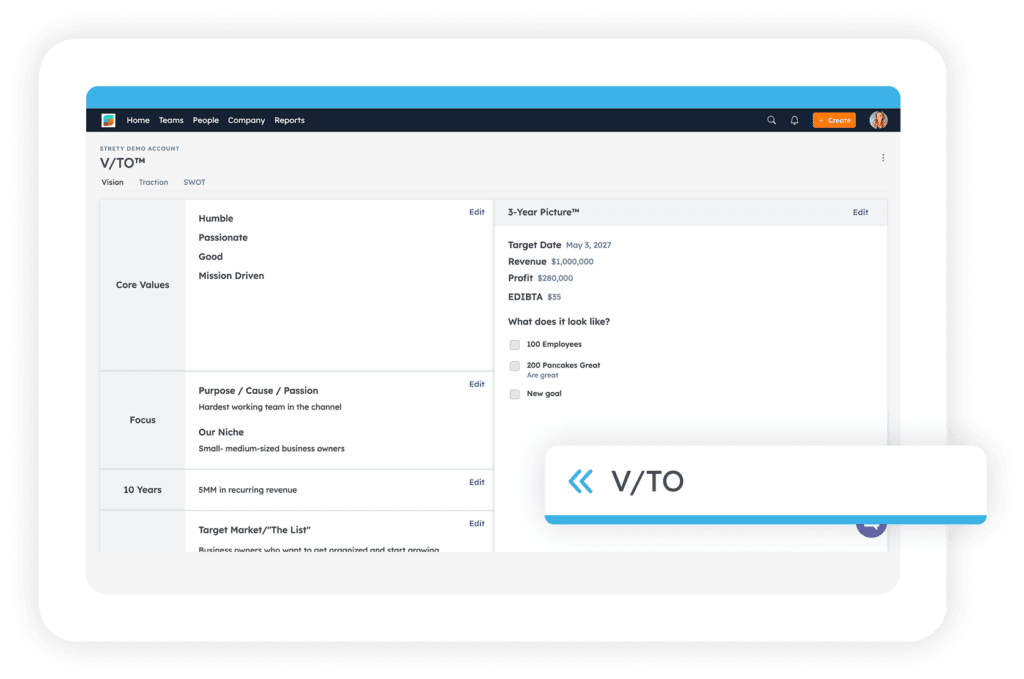
The Vision Component gets everyone in your organization on the same page about where you’re going and how you plan to get there. To create your V/TO, you answer eight specific questions that clarify your direction:
- Core Values: The three to five values that define who you are and how you operate
- Core Focus: Your purpose and niche — what you’re best at
- 10-Year Target: Your long-term vision for the business
- Marketing Strategy: Your target market and what makes you different
- 3-Year Picture: Where you’ll be three years from now
- 1-Year Plan: Specific revenue, profit, and measurable goals for this year
- Rocks: The three to seven most important priorities for the next 90 days
- Issues List: Problems that need to be solved
The primary EOS tool here is the Vision/Traction Organizer, or V/TO, which documents these answers on a single two-page document. When you do this well, your team can explain where you’re headed and why it matters.
If you want to go deeper on this part of EOS, read our vision and mission statement guide.
People
You can’t achieve a great vision without great people. The People Component focuses on two ideas: Right People and Right Seats.
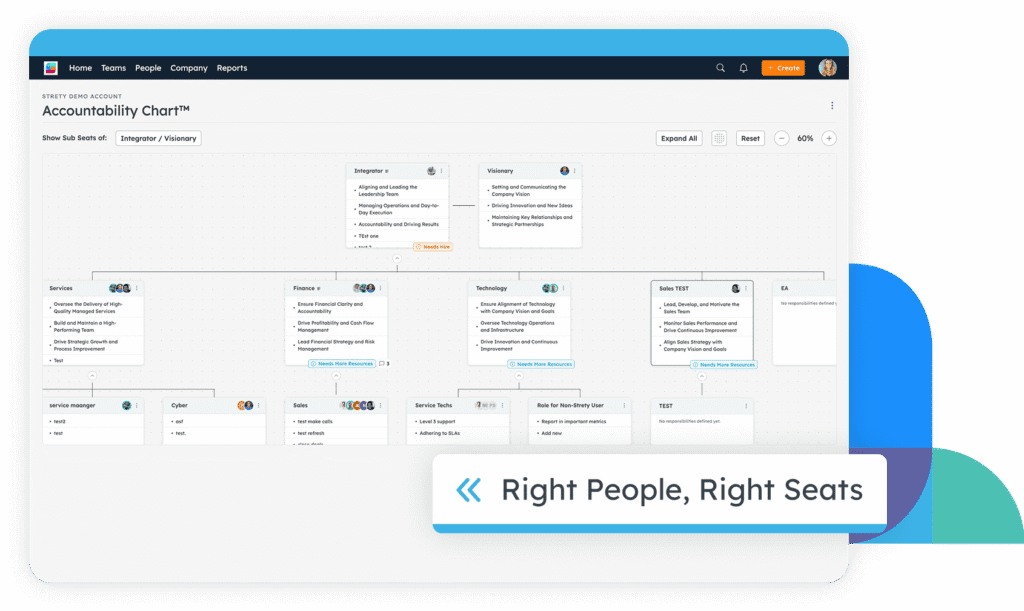
Right People means your team shares your core values. You assess this using a People Analyzer tool that helps you evaluate whether each team member actually reflects those values. Right Seats means each person has a clearly defined role with specific responsibilities, and they get it, want it, and have the capacity to do it well.
The EOS Accountability Chart replaces a traditional org chart by focusing on functions and responsibilities rather than titles and reporting lines. Each seat has a clear role, so you’ve got much better visibility into who owns what.
As you implement EOS, this is often where you start bringing more clarity to structure, expectations, and accountability.
Data
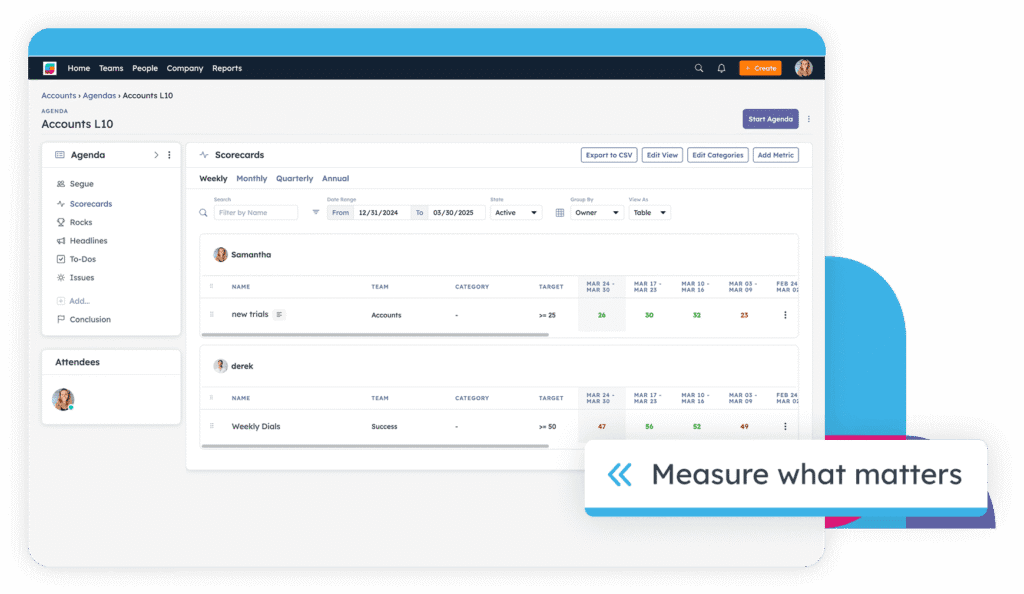
The Data Component helps you take guesswork out of decision-making by focusing on objective numbers. When you review the right data each week, you can see what’s working, where attention is needed, and which issues should move up the list.
Every EOS company creates an EOS Scorecard with a focused set of numbers reviewed weekly. These aren’t vanity metrics. They’re the numbers that help you predict whether the business is healthy. For a service company, that might include new leads, proposal conversion rate, project completion percentage, customer satisfaction, and cash position.
Each seat in your organization can also own Measurables — specific numbers tied to that role. This gives you a weekly pulse on performance and helps you spot issues early.
When you’re running EOS consistently, the Scorecard becomes one of the most practical tools in your weekly rhythm.
Issues
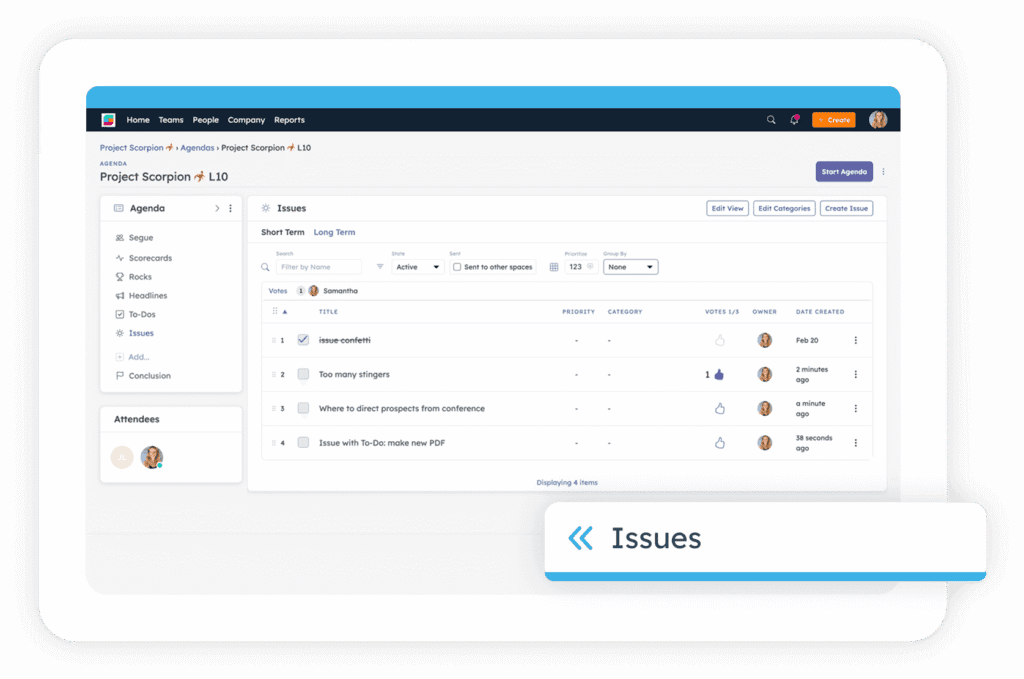
Issues are inevitable. EOS gives you a structured way to solve them through IDS: Identify, Discuss, Solve. For a closer look at this workflow, see our guide to the Issues Solving Track.
You identify the real issue, discuss it until everyone understands it, and solve it with a clear action item, owner, and due date. You also maintain an Issues List so important topics stay visible and get worked through in priority order.
This gives your meetings a more productive rhythm. Issues get surfaced, discussed, and resolved in a shared system, and your team has a clearer path from conversation to action.
Process
The Process Component helps you build consistency and scale by documenting how your business actually operates. Most businesses have core processes that repeat — sales, project delivery, customer onboarding, billing, hiring, and support — but those processes often live in people’s heads rather than somewhere your team can reference them.
EOS companies identify their core processes and document them at a high level. The goal is to capture the essential steps so your team can follow the same proven approach. You can see how this works in practice in our EOS Core Process guide.
When you document your processes, you can train new employees faster, create more consistency, spot improvement opportunities, and reduce dependence on any one person.
Traction
Traction is where vision turns into execution. This component brings discipline and accountability to your organization so you actually get things done.
The two primary tools here are Rocks and the Meeting Pulse.
Rocks are your three to seven most important priorities for the next 90 days. These are the projects and goals that move your business forward. Your weekly meeting rhythm then helps you review progress, solve issues, and keep those priorities on track.
The Meeting Pulse establishes a rhythm of regular meetings:
- Weekly Level 10 Meetings with each team
- Quarterly planning sessions to set Rocks and review the V/TO
- Annual planning sessions to update your vision
Once you’re running weekly meetings, tracking Scorecards, reviewing Rocks, solving issues, and assigning To-Dos, your operating rhythm becomes much more visible. That’s also the point where your setup needs to support the way your team works day to day.
How EOS Actually Works in Practice
Implementing EOS is a journey, not a one-time project. Full implementation takes time, and you’ll usually start seeing benefits well before you’ve rolled out every component.
In your first 90 days, you typically focus on Vision and People. Your leadership team completes the V/TO, establishes core values, gets clear on structure, begins weekly Level 10 Meetings, and sets the first Rocks. These early steps can create quick clarity around priorities.
Over the following months, you strengthen the Data, Issues, and Process components. You build your Scorecard, start using IDS more consistently, and begin documenting the core processes your business depends on.
As EOS gets more established, all six components start working together more naturally. The framework works best when it becomes part of how you operate — not something your team revisits once in a while.
Most companies choose between two implementation paths:
- Working with an EOS Implementer: A certified professional guides you through the process over time and helps your team stay on track.
- Self-implementation: You read Traction and other EOS books, then implement the tools yourself.
Both paths work. The right fit depends on the level of support, structure, and accountability you want during implementation.
No matter which path you choose, you still need a way to run EOS day to day. That’s where your operating setup matters.
Who Should Use EOS?
EOS works best for organizations with enough complexity that a shared operating system will make a meaningful difference.
It’s often a good fit if you’re:
- Running a company with 10 or more employees
- Growth-oriented and looking to scale with more structure
- Open to change and willing to build new habits
- Leading multiple departments or functions that need coordination
- Ready to commit to a weekly, quarterly, and annual operating rhythm
It tends to work especially well in professional services, software and technology, manufacturing, construction, healthcare practices, MSPs, IT companies, and accounting firms.
You might be ready for EOS if:
- You feel like the business has hit a ceiling
- Different departments aren’t always pulling in the same direction
- Accountability feels inconsistent
- Meetings take time without resolving enough
- You want everyone more connected to the same priorities
- You want a better way to turn vision into execution
EOS might not be the right fit if you’re a solopreneur, if your leadership team isn’t ready to commit to a structured cadence, or if you prefer a very loose operating style.
The Benefits of Implementing EOS
When you implement EOS well, the benefits build over time.
You get more clarity because everyone understands where the company’s going and what matters most. You get better accountability because roles, Measurables, and priorities are easier to see and discuss. You improve execution because the 90-day Rock rhythm keeps your team focused on the work that matters most right now.
EOS also gives you a more consistent way to solve problems. The IDS process helps your team move issues forward instead of recycling the same conversations. Team health tends to improve as people use the same language, follow the same rhythm, and understand how decisions get made. Documented processes make it easier for you to scale with more consistency. And the Scorecard gives you better data for making decisions.
All of that matters even more when the system is easy for your team to use. The more usable EOS feels in practice, the more likely your team is to stick with it.
Common EOS Implementation Challenges
EOS might be simple in concept, but it still takes commitment to implement well.
The first challenge is usually time. Quarterly sessions, weekly meetings, Scorecard reviews, and process documentation all require leadership attention. That time is usually well spent, but it still needs a place on the calendar.
The next challenge is consistency. It’s easy to feel energized by EOS at the beginning. The harder part is keeping the rhythm going when the quarter gets busy and your team is managing a lot at once.
You might also run into resistance around new terminology, new expectations, or the structure EOS introduces. Some teams need time to get comfortable with Level 10s, Rocks, IDS, and the Accountability Chart. Some leaders also discover they need to make hard decisions about roles, responsibilities, or whether someone is actually in the right seat.
Another common challenge is operational. When your V/TO, Scorecard, Issues List, meeting notes, and To-Dos all live in separate places, EOS starts to feel heavier than it should. The framework is still valuable — your setup just might need more support as the company grows.
That’s one reason software becomes an important part of the conversation.
EOS Software vs. Manual Implementation
When you start implementing EOS, you need tools to track your V/TO, Rocks, Issues List, Scorecard numbers, meeting agendas, and Accountability Chart. In practice, most companies end up in one of three setups.
Spreadsheets and Documents
Many companies start here — Google Docs for the V/TO, spreadsheets for the Scorecard, and separate notes for meetings and action items. This can be a reasonable way to start because it helps you see the framework in action without a big commitment.
Over time, this setup gets harder to manage. Information gets scattered. Updates become manual. Finding the right context from past quarters takes more time than it should.
Generic Project Management Tools
Some teams try to run EOS in tools like Asana, Monday.com, Notion, or a mix of project and documentation software. These tools can do a lot, and they weren’t built around the EOS framework. That usually means extra customization and parts of the rhythm that still feel disconnected.
Dedicated EOS Software
Dedicated EOS software is built specifically to help you run meetings, manage Rocks, track Scorecards, solve issues, and keep accountability visible — all in one place.
The right software keeps your operating rhythm usable. It cuts the overhead that comes from moving between files and tools. It also makes it easier for your team to stay connected to the same priorities throughout the quarter.
If you’re serious about implementing EOS long term, software can help you keep the framework clear, consistent, and easier to maintain. Learn more about how Strety differs from other EOS software alternatives on the market: Strety vs Ninety.io | Strety vs Bloom Growth
How to Run EOS Day to Day with Software
Once you’re actively running EOS, you need a practical way to manage the weekly and quarterly rhythm. Your meetings, issues, priorities, numbers, and follow-through all need to stay connected. And the system needs to fit the way your team already works.
Good EOS software should help you:
- Keep your weekly meeting rhythm in one place
- Make Rocks visible between meetings
- Connect strategy to day-to-day execution
- Reduce double entry across tools
- Support adoption beyond just the leadership team
When your agenda, Scorecard, Issues, Headlines, To-Dos, and Rock check-ins are all connected, meetings are easier to run and follow-through is easier to track.
When your software works with tools your team already uses, like Microsoft Teams or Slack, adoption gets a lot easier. You spend less time copying information between systems and more time keeping your team on the same page.
This is the point where many teams start looking for software built for everyday EOS.
Getting Started with EOS
If you’re interested in implementing EOS, here’s a practical roadmap.
Step 1: Read Traction Start with Gino Wickman’s book Traction: Get a Grip on Your Business. It’s the foundational text that explains EOS clearly. Read it yourself first, then have your leadership team read it so you’re all working from the same understanding.
Step 2: Assess your current state Look at where your business stands across the six key components. Identify the areas where you need the most support right now.
Step 3: Build leadership team buy-in EOS works best when your leadership team commits to it. Make time to discuss what you learned, where the system feels helpful, and what commitment it’ll require from the team.
Step 4: Choose your implementation approach Decide whether you want to work with an EOS Implementer or self-implement. Both approaches work — the right fit depends on how much support and structure you want during the rollout.
Step 5: Start with Vision Complete your Vision/Traction Organizer with your leadership team. Give this enough time. The clarity you build here sets the foundation for everything else.
Step 6: Launch Level 10 Meetings Begin weekly Level 10 Meetings with your leadership team. Use the agenda consistently so the rhythm becomes familiar.
Step 7: Set your first Rocks Based on your 1-Year Plan, define the most important priorities for the next 90 days. Make sure each Rock has a clear owner and a clear outcome.
Step 8: Choose your tools Decide how you’re going to track EOS. You can start with spreadsheets, use a hybrid setup, or move into dedicated software. The important thing is choosing a system your team can actually maintain.
Step 9: Expect a learning curve Around the 90-day mark, many teams start to feel the effort required to keep the system going. That’s normal. Stick with it. EOS becomes more valuable as the rhythm becomes part of how you work.
Step 10: Improve over time EOS is a journey. Each quarter gives you a chance to get better at using the tools and building the habits that support them.
If you want more guidance on choosing your path, read our guide on getting started on EOS. If you’re deciding whether outside support makes sense, read our guide on how to choose the right EOS Implementer.
Why Operators Choose Strety for EOS Software
We built Strety because we lived through the frustrations of implementing EOS manually. As operators running our own business on EOS, we experienced how disconnected systems, duplicate work, and scattered information make the framework harder to run than it needs to be.
When you’re working across meetings, priorities, issues, and follow-through, your software needs to support the rhythm you’re building. You need one place for meetings, priorities, issues, accountability, and follow-through. And you need a setup that reduces tool sprawl instead of adding another disconnected layer to the stack.
Strety is built for that reality.
With Strety, you can keep your EOS rhythm in one place, connect your weekly and quarterly execution, and give your team a system that’s easier to use day to day. We built it as operators, for operators.
If you’re evaluating software to support your EOS rollout, you might also want to read our guide to the best EOS software for small businesses.
Final Thoughts
The Entrepreneurial Operating System has helped many businesses gain more clarity, better team alignment, and stronger traction. It takes commitment, and it gives you a proven framework for getting your leadership team on the same page, solving issues, and turning priorities into consistent execution.
The six key components — Vision, People, Data, Issues, Process, and Traction — work together as one system. When you strengthen all six, your business becomes more coordinated, more focused, and easier to run.
As you implement EOS, your team also needs a practical way to manage meetings, Rocks, Scorecards, Issues, and To-Dos without adding unnecessary overhead. If you want to run EOS with less admin and better visibility, start your free trial or book a demo.
If you want more context before choosing your next step, explore our EOS implementation wiki, our guide on getting started on EOS, and our guide to the best EOS software for small businesses.