Rocks in Strety

EOS Rocks software that helps you stay on track — week after week, quarter after quarter

Transform your Vision into action with Rocks in EOS software that links your quarterly objectives directly to annual goals. From linkage to the big picture to weekly L10 check-ins, you’ll never have to guess what’s on track or have that “oh shoot” moment at the end of the quarter. Easily set up Milestones, connect Projects to Rocks, and get AI-powered suggestions to set and crush your 90-day priorities.
EOS Rocks in Strety

How Strety’s Rocks work

Creating and keeping track of your SMART Rocks in Strety only takes a few clicks. It’s intuitive and built to be easy enough for your whole team to create and manage the Rocks that will get your business traction.
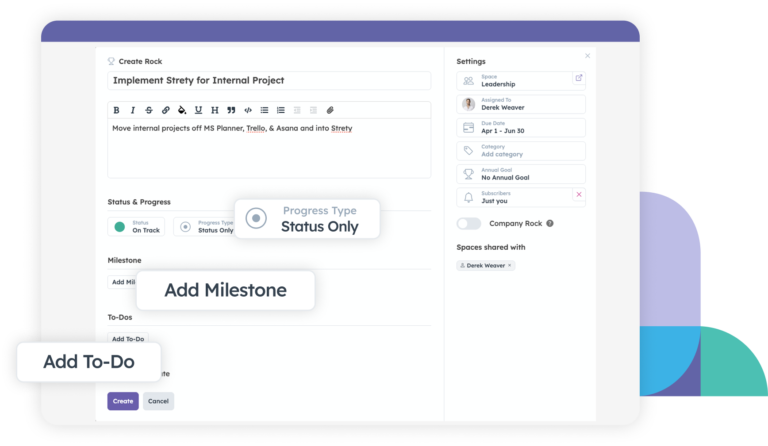
Go to your Rocks section in Strety and click on “Create” to start building your quarterly Rocks.
In a couple of simple steps, you’ll have all your priorities aligned with your quarterly goals.
Create EOS Rocks in Strety

Make the Rock exactly as you want it. Choose the assignee, the type of Rock (personal, team or company Rock), the progress type, your Milestones, and link it to the annual goal you want. 

Add the integrations you need to make your work flow easily between platforms.
Add Milestones to EOS Rocks in Strety
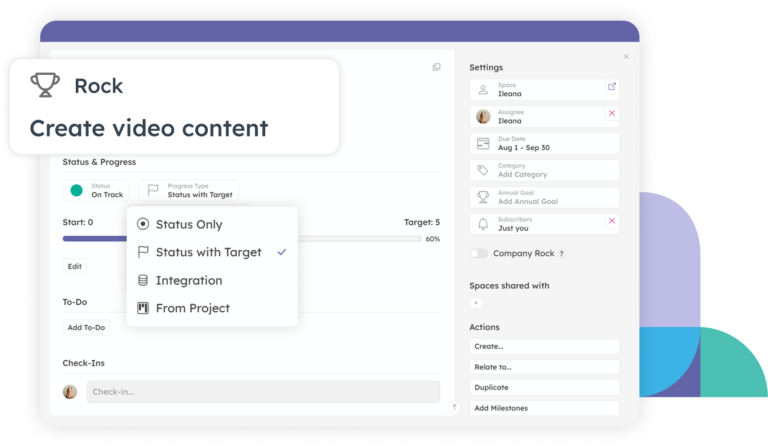
Every Rock can check in its own way — a two-click On Track / Off Track toggle, a real number against a target, or completely on autopilot when it’s linked to a Project or synced through an integration.

Whichever way you track it, each Rock’s latest status shows up in your weekly L10.

Tracking EOS Rocks progress in Strety
AI Suggestions for EOS Rocks in Strety

Get smarter, faster EOS Rocks with AI Suggestions

Avoid blank page syndrome and get relevant, timely Rocks started in seconds with Strety’s AI Rock Suggestion tool. Connected to your EOS info — like your V/TO and recurring Issues — and generated with a customizable prompt, AI Rocks get your quarter off to a quicker, smarter start.

Get Rocks to the finish line with Strety Projects

Bring execution to your Rocks with Projects built directly in Strety for real ownership, visibility and cadence. Link Strety’s project space to your 90-day priorities, get cross-functional contributions with clear ownership and less friction, and break big goals down into the achievable tasks that get you to completed work.
Porjects spaces with kanban view in Strety, linked to Rocks

The EOS Rocks software people love

Your tech stack should make it easier to accomplish your priorities. Strety’s EOS Rocks tool is built for clarity, accountability, and easy set-up, so your whole team can enjoy traction.

Label by category

Sort your Rocks by category to keep your EOS work organized in Strety.

Link to annual goals

Never lose track of the big picture by linking your EOS Rocks to your annual goals.

Sync your Rocks

Make progress wherever you work — link Rocks to Strety Projects, Autotask, Microsoft Planner, and Connectwise.

Break into Milestones

Set Milestones within your Strety Rocks to get your work to the finish line more easily.

Visible where you want

Create Rocks visible only to you or to the rest of the team and company — the choice is yours.

Keep in backlog

Save Rocks that can’t move forward in the Backlog and come back to them when you’re ready.

Frequently asked questions about Strety’s EOS Rocks

EOS® Rocks software helps you set, track, and complete the 3–7 priorities your team commits to each quarter. In Strety, Rocks live inside your L10 meetings and connect directly to your annual goals and V/TO, so quarterly priorities and long-term direction stay in sync automatically.
Strety is the only EOS software with built-in project management — Rocks connect natively to Strety Projects as well as your Issues and L10 meetings — instead of living in a standalone tracker. Track progress with a Project space, a simple on/off toggle, a real numeric target, and turn an off-track Rock into an Issue with one click, so nothing gets lost between tools.

Use a Rock when a simple status update is enough for your weekly L10. Use a Project when the work needs more room or cross-team input. Link the Rock to a Project, and the Rock’s status updates automatically from the Project. (Full breakdown: strety.com/blog/strety-projects-rocks/)

Yes — Strety’s AI Rock suggestion tool creates relevant suggestions in seconds, combining your account context and our EOS knowledge database, so your Rocks always align with your company goals, and are set to keep traction moving quarter after quarter. However, you’re always in control and can decide if to move forward or not with the AI suggestions.

You’re always in control — the AI Rock suggestion tool is there to help you get started or get unstuck, but you can write, edit, or replace any suggested Rock yourself.
Yes — set each Rock at the Company, Team, or Personal level depending on who owns it, so everyone sees exactly the priorities relevant to them.

You can set a starting value, a target, and a unit — dollars, percentage, or count — so a Rock like “$30K in new MRR” can track real progress in Strety.

Yes — check in on your Rocks from Strety’s iPhone or Android app between meetings. Stay on top of what’s going on, even when you’re away from your desk.

Yes — link a Rock in Strety to a project in Microsoft Planner, ConnectWise, or Autotask, and its status updates automatically as the linked work gets done.

Yes — many teams make the switch in about a week. Recreate your current Rocks with an owner, due date, and progress type, and you’re ready to run your next L10 in Strety without missing a beat. You can also use Strety’s MCP to build a whole project in minutes — simply add your existing project data there and ask the AI tool of your choice to re-build it in Strety just how you want it.

Rocks are part of the core Strety platform which starts at $13/seat, month to month, no contracts or gotchas. See details and volume pricing breaks at strety.com/pricing.

Yes — start your free 30-day trial, no credit card required, and set up and start executing your first quarter of Rocks before you commit to anything.

More to Explore

Want a full walkthrough on how to work with EOS Rocks in Strety? Start here.
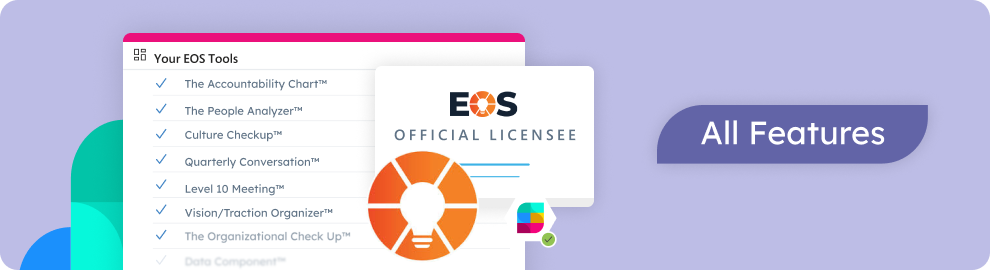
Discover all Strety’s built-in tools for EOS® implementation plus everyday execution.
Check out Strety’s integrations to connect your fav tools with your EOS® implementation.

Want to test-drive building Rocks in EOS software?

Start your free 30-day trial in Strety and break through the ceiling with SMART Rocks finally linked to the rest of your EOS workflow.

Proud Platinum sponsor for the EOS community! Join us: