I work with leadership teams every week who are running on EOS. They’ve nailed their V/TO, they’re holding strong L10s, their Rocks are on track — and then I ask about Process, and the room goes quiet. That gap between “we have processes” and “our processes are followed by all” is costing you real money. Rework. Onboarding that takes twice as long as it should. Leaders answering the same questions week after week. I built a Profit Leak Calculator to help teams put a dollar figure on it, and the numbers always surprise people.
That’s why I was excited to partner with the Strety team on their Process tool. Strety builds the full process journey — from identifying your core processes through to the Followed By All framework — directly into the platform where your team already runs L10s, tracks Rocks, and reviews the Scorecard. Process work stays visible instead of dying in a shared drive. I want to walk you through how to get started.
Table of Contents
- Before you open Strety
- Setting up your Process page in Strety
- Tracking progress with phases
- Publishing and getting your team on board
- The part that actually matters: Followed By All
- Your getting-started checklist
- Where to go from here
Before you open Strety
This is the part people want to skip, and I need you not to skip it.
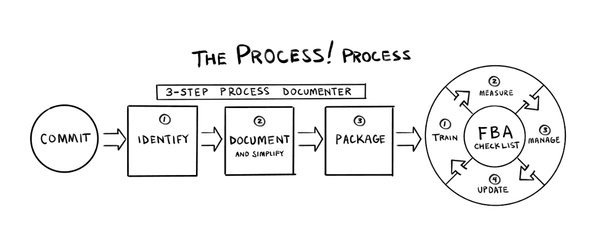
Your leadership team has to commit to process work before you touch any software. That means having an honest conversation about what a lack of process is costing the business — in dollars, in time, in frustration. Use the Profit Leak Calculator if you need a starting point. When your team sees the number, the commitment usually follows.
Once you have commitment, you need to identify your core processes as a team. This is usually a one-hour meeting with your leadership team or your EOS Implementer. You’re identifying your handful of core processes — typically HR, Sales, Marketing, Operations, Accounting, and a few others specific to your business. Every core process needs an owner. If you haven’t done this step yet, the Process! book walks you through it, or your Implementer can facilitate it.
These two things — commit and identify — need to happen before the software matters.
Setting up your Process page in Strety
Once your team is ready, the setup is fast.
Go into your Strety account, navigate to your team, and click the “+” to add the Process page. While you’re there, add the Playbooks page too — you’ll use it later. Now click “Create Core Process” and name your first one. I always recommend starting with HR, because every company has people and every company has an HR process, whether they’ve written it down or not.
When you create a core process, Strety offers you templates as a starting point. I helped design these with the Strety team, and the idea is simple: they capture the 20% of steps that get you 80% of the results. They’re there to get you past blank-page syndrome. Pick the template, assign the owner, and hit Create.
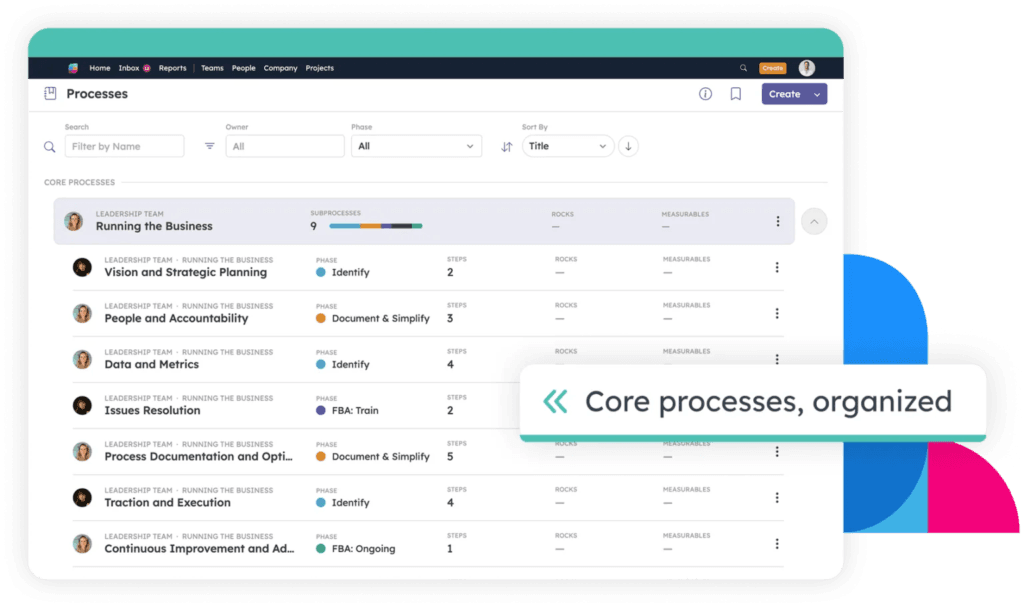
What you’ll see is a starting structure of sub-processes under that core process. For HR, that might include Recruiting, Interviewing, Onboarding, Employee Development, Employee Engagement, Comp and Benefits, and Offboarding. You can add, remove, and edit these to match how your business actually operates. The key thing here is to keep it high level. One to three pages per core process. If you’re writing 47 pages of documentation, you’ve gone too deep, and that’s how documentation dies. Nobody follows a 47-page process manual.
Tracking progress with phases
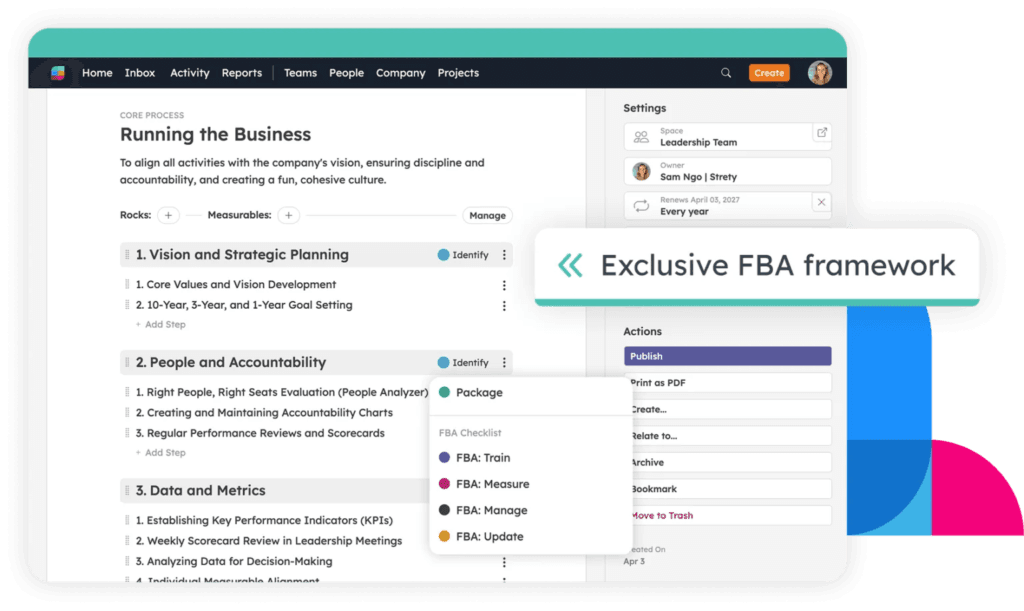
One of the features I appreciate most about Strety’s Process tool is the phase tracking. Each sub-process can be set to a phase: Identify, Document and Simplify, or Package. These phases follow the three-step Process Documenter from EOS — and each phase assumes you’ve completed the one before it. You can only move to Package if you’ve already documented and simplified.
This matters because it gives your leadership team a dashboard view of where every process stands at a glance. During your quarterly Rock planning, you can look at the Process dashboard and say, “Okay, HR is at Package, Sales is still at Document and Simplify, and Marketing hasn’t started.” That clarity drives better Rocks and better quarterly priorities.
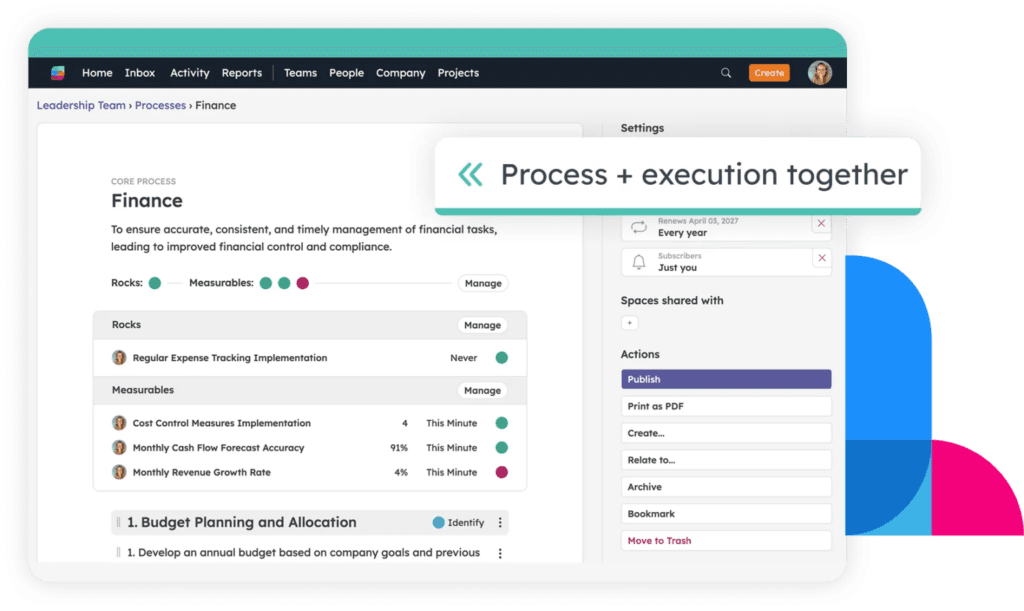
Speaking of Rocks — you can tie each core process directly to a Rock in Strety. If your team sets a Rock this quarter to document and simplify your HR process, you attach that Rock right to the process. The owner stays aligned, the progress is tracked in one place, and you’re not managing it through a side spreadsheet. You can also connect processes to measurables on your Scorecard, so the metrics that tell you whether a process is working are visible right alongside the process itself.
Publishing and getting your team on board
Once a process is documented and you’re happy with it, hit the Publish button. Publishing makes it visible to your entire team in Strety — which is the point. A process that lives in a leader’s head or a draft document is functionally the same as having no process. Publishing it says, “This is how we do this, and it’s ready for everyone.”
This is also where Playbooks come in. If you already have documented processes living in Google Docs, SharePoint, or uploaded PDFs, you can connect those directly in the Playbooks section. Eventually, Playbooks and core processes will be fully integrated, but even now, it gives your team a single place to find everything.
The part that actually matters: Followed By All
Getting processes documented is just the beginning of your process journey. Getting them followed by all is where the real value lives — and where most teams stall out.
The FBA framework has four pieces that cycle continuously:
Train. Process compliance requires ongoing coaching. You can’t hand someone a document and expect behavior change. Walk your team through the process. Answer questions. Revisit it during onboarding. Training is ongoing, not a one-time event.
Measure. Attach a number to it. If you can’t measure whether a process is being followed, you can’t manage it. This is where connecting your processes to Scorecard measurables in Strety keeps everything honest.
Manage. When a process isn’t followed, what happens? Is it a coaching conversation? Additional training? A serious discussion? The process owner is the champion here — they’re responsible for making sure it sticks, regardless of who’s using it day to day.
Update. At least once a year, look at your processes with fresh eyes. Is this streamlined? Can we remove a step? How can we innovate?
These four steps — Train, Measure, Manage, Update — are what turn a documented process into a living part of how your company operates. And the fact that Strety keeps all of this connected to your Rocks, your Scorecard, and your L10 meeting means it stays in front of your leadership team every week. Process work stops being forever incomplete and becomes part of your weekly rhythm.
Your getting-started checklist
I put together a checklist for teams using the Process Success FBA framework in Strety. Here’s the condensed version — you can download the full checklist with the diagram below.
Step 1 — Before you open Strety: Leadership team has committed to process work. Core processes identified as a team. Each core process has an owner.
Step 2 — Set up your Process page: Add the Process and Playbooks pages in Strety. Create your first core process. Choose the template for a starting point.
Step 3 — Document your first core process: Add the purpose statement. Review and edit the sub-processes. Keep it high level — one to three pages. Set the phase for each sub-process. Hit Publish.
Step 4 — Connect to Rocks and plan ahead: Tie each core process to the relevant Rock. Plan future Rocks for getting all processes documented. Use the Process dashboard during Rock planning each quarter.
Step 5 — Add your Playbooks: Move existing documentation into the Playbooks section. Connect to SharePoint, Google Docs, or upload directly. Publish so your team can access everything in one place.
Step 6 — Share it with your team: Notify your team the process is live. Collect feedback. Celebrate — seriously. Process work is hard, and getting one core process documented and published is a real milestone.
Where to go from here
If your team is running on EOS and you haven’t prioritized the Process Component, this is a great quarter to start. You don’t have to document every process at once. Pick one core process — I always say start with HR — get it documented, simplified, and published in Strety, and build momentum from there.
If you want to go deeper on the framework, my book Process! How Discipline and Consistency Will Set You and Your Business Free (co-authored with Mike Paton) covers the full methodology. And if your team needs hands-on guidance, I offer advisory services, bootcamps, and workshops to help leadership teams build process discipline that lasts.
Your processes deserve more than a dusty Google Doc. Get them into the place where your team already works — and get them followed by all.
Download my full checklist as a PDF here.
Check out the Strety Help Doc for Process here.

Lisa González is a Certified EOS Implementer, co-author of Process! How Discipline and Consistency Will Set You and Your Business Free (EOS Traction Library), and the creator of the Process Success™ framework. She’s helped hundreds of leadership teams close the gap between documented processes and processes that are actually followed. Learn more at lisagonzalez.com.